Building KiCad 5 & 7 for Slackware 15.1+
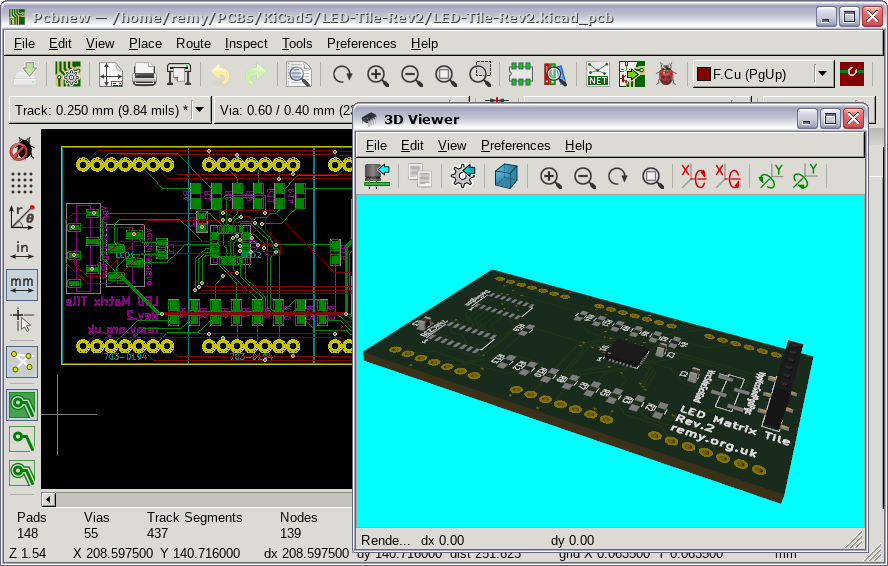
03 May 2026This is the follow-up to building KiCad 4 for Slackware 15.1+ which was originally intended to cover KiCad 5 as well, but due to the lack of overlap in dependencies the details of the latter were spun out into this separate write-up. These together were made so that my notes on how to build KiCad don't get lost to time before Slackware 15.1 is formally released, and since the dependencies overlap a lot KiCad 7 is also covered. All this is part of a much broader effort of getting various applications working with the current developmental branch of Slackware, which I am already using and the release of Slackware 15.1 may well be around the corner by the time I am building a new workstation.
Using SlackBuilds with Slackware current
By and large SlackBuild scripts for Slackware 15.0 work with 15.1+ although in some cases manual intervention is needed rather than letting SBoPkg do its automagic, the problem almost invariably being something done that the bleeding-edge version of either CMake or GCC dislikes. A very common one is types such asint64_t no longer being automatically available and another is introduction of new keywords such as bool that clash with other identifiers.
For GCC the expedient solution is usually somehow getting some combination of -std=c17, -std=c++17, -fpermissive, and/or -include cstdint into CFLAGS and/or CXXFLAGS although there are cases where this is difficult or does not work at all.
As for CMake the two options are the CMake-suggested use of the option -DCMAKE_POLICY_VERSION_MINIMUM=3.5, and using a custom-build of a pre-v4 CMake.
The latter is more convenient as it can be placed in the ${PATH} enviornment variable ahead of the default system CMake and then SboPkg used as normal to process SlackBuild scripts, whereas the former is more convenient when CMake has to be run manually with other parameters.
At time of writing the v3.x branch is still maintained so there should be no issues with it being out of date.
Dependencies
While KiCad 5 needs a lot more dependencies than KiCad 4 they are generally less troublesome and the pit-falls are a lot better than the experience of building Kicad v5.1.4 back in 2019, and if Python scripting functionality is not required for KiCad 7 the number of dependencies is hugely reduced. The vast majority of dependencies are SlackBuilds that can be installed via SboPkg and where a version number is given it is the release that is current at time of writing. However with some of these dependencies there are gotchas which need to be worked around.Boost v1.85.0
Because of a change in Boost’s definiton ofdigest_type between the consecutive v1.85.0 and v1.86.0 KiCad 5 needs to be built using the former version or earlier in order to avoid the following error:
3d_cache.cpp:390:24: error: cannot convert 'unsigned int [5]' to 'unsigned char (&)[20]'
However since Boost in turn depends on NumPy which changed how elsize is accessed it needs to be patched to use the new method in order to avoid the following while building:
libs/python/src/numpy/dtype.cpp:101:83: error: 'PyArray_Descr' {aka 'struct _PyArray_Descr'} has no member named 'elsize'
This change can be done using the following patch:
--- a/libs/python/src/numpy/dtype.cpp +++ b/libs/python/src/numpy/dtype.cpp @@ -98,7 +98,8 @@ python::detail::new_reference dtype::convert(object const & arg, bool align) return python::detail::new_reference(reinterpret_cast<PyObject*>(obj)); } -int dtype::get_itemsize() const { return reinterpret_cast<PyArray_Descr*>(ptr())->elsize;} +// https://github.com/boostorg/python/issues/431 +int dtype::get_itemsize() const { return PyDataType_ELSIZE(reinterpret_cast<PyArray_Descr*>(ptr())); } bool equivalent(dtype const & a, dtype const & b) { // On Windows x64, the behaviour described on
And finally building and installation is done using the following commands:
./bootstrap.sh --prefix=/opt/boost/1.85.0 ./b2 -q cxxflags="-std=c++11 -fpermissive -Wno-deprecated-declarations -Wno-template-body -Wuninitialized" variant=release ./b2 install
CMake v3.31.11
At the time of writing CMake v3.31.11 is the latest release of the v3.x branch of CMake. For convenience it may be easier to use this versions for building all packages rather than just ones that cause the system CMake to choke. Building and installing it is the standard tarball procedure:tar -xvf CMake-3.31.11.tar.gz cd CMake-3.31.11 ./configure --prefix=/opt/cmake/3.31.11 make make install
glm v0.9.9.5
Aside from needing pre-v4.0 CMake the glm SlackBuild which at time of writing uses v0.9.9.5 can be built via SbkPkg.nanosvg (snapshot 20231024_cb0ae5)
An unstated dependency of wxWidgets which if not installed results in ansubmodule init error, which is a dead-end for a tarball which does not include Git meta-data.
There are no issues installing nanosvg via SboPkg.
ngspice v44.2
The SlackBuild info file within the ngspace SlackBuild is out of date with broken download links so SboPkg fail trying to build it, but the SlackBuild script itself is fine. At time of writing running the following commands will fetch all the required bits and build the ngspice package.wget https://slackbuilds.org/slackbuilds/15.0/academic/ngspice.tar.gz tar -xvf ngspice.tar.gz cd ngspice wget https://sourceforge.net/projects/ngspice/files/ng-spice-rework/old-releases/44.2/ngspice-44.2.tar.gz wget https://sourceforge.net/projects/ngspice/files/ng-spice-rework/old-releases/44.2/ngspice-44-manual.pdf ./ngspice.SlackBuild
The built ngspice package /tmp/ngspice-44.2-x86_64-1_SBo.tgz will then be ready for installation.
OpenCASCADE v0.18.31
KiCad can be built with one of two forks of OpenCASCADE: The standard edition which the OpenCASCADE SlackBuild generates, and the community edition. Building KiCad 5 using the standard edition resulted in errors withclass Poly_Triangulation having no member Nodes and it was easier to build against the community edition which is a known-good rather than figuring out the bit-rot with respect to the standard edition.
The following snippet grabs the source code for v0.18.3 the community editing then builds and installs it.
wget https://github.com/tpaviot/oce/archive/refs/tags/OCE-0.18.3.tar.gz tar -xvf OCE-0.18.3.tar.gz cd oce-OCE-0.18.3 mkdir build cd build export PATH=/opt/cmake/3.31.11/bin:$PATH CXXFLAGS="-fpermissive" cmake -DOCE_INSTALL_PREFIX:PATH=/opt/oce/0.18.3 .. make -j12 make install
Note the adding of /opt/cmake/3.31.11/bin to the path that is CMake v3.31.11 from above.
Once done the OpenCascade community edition will be installed under /opt/oce/0.18.3.
SWIG
Even if Python scripting is disabled the KiCad 5 build process still tries to generate bindings using SWIG and with recent versions the failure shown below occurs. This failure happens very late in the build process — at the 83% mark — so via a long-winded process of trial-and-error it was found that this happens with versions of SWIG later than v4.0.2 so this version is used.Error: the swig import helper was not fixed, check /home/remy/build/pcbnew/pcbnew.py and fix this script: fix_swig_imports.py
Building this good version of SWIG is once again the standard tarball procedure:
tar swig-4.0.2.tar.gz cd swig-4.0.2 ./configure --prefix=/opt/swig/4.0.2 make make install
The outcome of this is SWIG v4.0.2 being installed into /opt/swig/4.0.2.
VTK (9.4.1)
This is a dependency of the standard edition of OpenCASCADE and there are no issues installing it with its SlackBuild script via SboPkg.OpenCASCADE v7.7.0
KiCad 7 and later (and likely KiCad 6 but this has not been tested) are fine using the OpenCASCADE standard edition. The SlackBuild script needs to be built using the pre-v4.0 CMake but it can be handled using SboPkg. Note the different numbering system compared to the community edition.wxWidgets and wxPython
In KiCad 5 wxPython support is optional and broken so building and installation of wxPython4 can be omitted and only wxWidgets itself needs to be installed which can be done via SboPkg. This is also an option for KiCad 7 if wxPython support is not needed but in this case it needs to be turned off by adding the-DKICAD_SCRIPTING_WXPYTHON=OFF to the CMake command-line.
Building wxPython4 requires wx/webview.h which is only available if wxWidgets is built with optional WebKit2-Gtk4.1 in addition to other dependencies.
Firstly the ones in this list which have no sub-dependencies need to be installed and all of these can be done vai SboPkg.
- python3-attrdict
- python3-build
- python3-flit_core
- python3-installer
- python3-pyproject-hooks
- python3-pathlib2
- python3-packaging-opt
- python3-setuptools-opt
- python3-typing-extensions
- python3-wheel
- xdg-dbus-proxy (0.1.4)
- geoclue2 (2.6.0)
- libwpe (1.16.3)
Bubblewrap (0.8.0)
Building Bubblewrap requires passing the-std=c17 to the CFLAGS enviornment variable, but because of the way the SlackBuild script is written the latter needs to be patched rather than being able to set enviornment variables on the command-line.
--- a/bubblewrap.SlackBuild +++ b/bubblewrap.SlackBuild @@ -77,7 +77,7 @@ \( -perm 666 -o -perm 664 -o -perm 640 -o -perm 600 -o -perm 444 \ -o -perm 440 -o -perm 400 \) -exec chmod 644 {} \; -CFLAGS="$SLKCFLAGS" \ +CFLAGS="$SLKCFLAGS -std=c17" \ CXXFLAGS="$SLKCFLAGS" \ ./configure \ --prefix=/usr \
For simplicity the following snippet fetches and builds Bubblewrap, including applying the above patch.
https://slackbuilds.org/slackbuilds/15.0/system/bubblewrap.tar.gz tar -xvf bubblewrap.tar.gz cd bubblewrap wget https://github.com/containers/bubblewrap/releases/download/v0.8.0/bubblewrap-0.8.0.tar.xz wget https://www.remy.org.uk/files/Fix-Bubblewrap-0.8.0.patch patch -p1 < Fix-Bubblewrap-0.8.0.patch ./bubblewrap.SlackBuild
Afterwards the built package is available as /tmp/bubblewrap-0.8.0-x86_64-1_SBo.tgz.
Unifdef (2.12)
The unifdef SlackBuild breaks because it usesconstexpr as a variable name which can be fixed by changing it to const_expr and the snippet below includes a line that adds such a stage to the SlackBuild script.
Bit of a nested hack but it works.
wget https://slackbuilds.org/slackbuilds/15.0/development/unifdef.tar.gz tar -xvf unifdef.tar.gz cd unifdef sed -i "60i sed -i 's/constexpr/const_expr/g' unifdef.c" unifdef.SlackBuild /unifdef.SlackBuild
The package will then be available as /tmp/unifdef-2.12-x86_64-1_SBo.tgz.
wpebackend-fdo (1.14.2)
This has a dependency on libwpe (built above) but otherwise the wpebackend-fdo Slackbuild script can be handled by SboPkg.WebKit, wxWidgets, and wxPython4
With all the dependencies above satisfied the following can be built and installed via SboPkg. Webkit in particular will take quite a long time to build.- webkit2gtk4.1 (2.46.6)
- wxWidgets (3.2.10)
- wxPython4 (4.2.5)
KiCad 5 build
To download the KiCad source code go to the tagged release on GitHub, press the blue button towards the top-right corner, and at the bottom of the pop-up menu under Download source code choose the preferred archive format. The snippet below kicks off the building and installation after applying a patch that does a few fixups, as well as changing the configuration file path to avoid a clash with KiCad 4. In the past I have preferred the appearance of KiCad 5 with wxWidgets built to use gtk2 rather than gtk3 but for simplicity this is not done here.tar -xvf kicad-5.1.12.tar.gz cd kicad-5.1.12 wget Fix-KiCad-5.1.12.patch patch -p1 < wget Fix-KiCad-5.1.12.patch cd build CXXFLAGS="-Wno-deprecated-declarations -Wno-template-id-cdtor -Wno-maybe-uninitialized -Wno-switch" \ cmake \ -DCMAKE_INSTALL_PREFIX=/opt/kicad/5.1.12 \ -DCMAKE_INSTALL_LIBDIR=lib64 \ -DKICAD_USE_OCE=OFF \ -DKICAD_USE_OCC=ON \ -DKICAD_SCRIPTING_WXPYTHON=OFF \ -DKICAD_SCRIPTING_PYTHON3=OFF \ -DCMAKE_BUILD_TYPE=Release \ .. make -j12 make install
Don't miss the double-dots on the last line.
The parameter in make -j12 causes twelve threads to be used rather than the default single-threaded operation, which can be set higher if there are extra cores to spare.
Resource archives containing things like component foorprints will also need to be downloaded and installed.
KiCad 7 build
The latest release of KiCad 7 is v7.0.11, which can be downloaded as a tar-ball using the blue ‘Code’ button at the top-right. By far the biggest headache is with nanodbc wherenanodbc::catalog::find_tables causes QA tests to fail the and (more often and annoyingly) the schema editor failing with an undefined symbol at run-time.
This seems to be a long-standing issue and looks like a mismatch between nanodbc::string being std::__cxx11::basic_string<char16_t> or std::__cxx11::basic_string<char32_t> although I also have suspicions that a change in Boost between v1.78.0 and v1.85.0 could be causing the fault.
Easiest fix is to disable Unicode within nanodbc, which is one of the things done in the build commands snippet below:
tar -xvf kicad-7.0.11.tar.gz mkdir build-kicad7 cd build-kicad7 CXXFLAGS="-fpermissive -include cstdint -Wno-template-id-cdtor " \ cmake \ -DCMAKE_INSTALL_PREFIX=/opt/kicad/7.0.11 \ -DCMAKE_PREFIX_PATH=/opt/boost/1.85.0 \ -DKICAD_USE_EGL=ON \ -DCMAKE_POLICY_VERSION_MINIMUM=3.5 \ -DNANODBC_ENABLE_UNICODE=OFF \ -DCMAKE_BUILD_TYPE=Release \ ../kicad-7.0.11 make -j 12 make install
Running KiCad
The following script which also supports the KiCad 4 build can be used to start KiCad 5 or 7. It sets up any required enviornment variables and then calls the appropriate KiCad binary.#!/bin/bash function show_opts { echo "USAGE: ${0} <4|5|7>" exit 1 } if [ ${#} -lt 1 ]; then show_opts fi case "${1}" in "4") KICAD_VERSION=4.0.7 LD_LIBRARY_PATH=/opt/wxWidgets/3.1.2/lib:/opt/boost/1.60.0/lib ;; "5") KICAD_VERSION=5.1.12 # ;; "7") KICAD_VERSION=7.0.11 LD_LIBRARY_PATH= ;; *) show_opts ;; esac LD_LIBRARY_PATH=${LD_LIBRARY_PATH}:/opt/kicad/${KICAD_VERSION}/lib64 LD_LIBRARY_PATH=${LD_LIBRARY_PATH}:/opt/kicad/${KICAD_VERSION}/kicad/plugins/3d export LD_LIBRARY_PATH /opt/kicad/${KICAD_VERSION}/bin/kicad
Remarks
Out of all three versions it turned out that KiCad 7 was the biggest pain as it was unclear why it was failing, unlike Boost with KiCad 4 which was at least known to be API breaks that somehow needed fixing. In hindsight having looked at notes from a previous successful attempt at building KiCad 7 I suspect that there is much more sensitivity to the version of Boost, and it is likely the combination of software versions documented here may well not be the best. A good portion of the fix-ups are dealing with broken SlackBuild scripts which I expect will get fixed when the next version of Slackware is officially released.Did briefly try KiCad 6 but hardly used it before KiCad 7 arrived so saw no value in getting the former working. Then stuck with KiCad 7 having at the time a plan to leap-frog over KiCad 8 to KiCad 9, but then events caught up and have done very few PCB projects since so have yet to try any version later than KiCad 7. KiCad 10 appears to have some interesting features but as things stand it is logistically simpler to stick with KiCad 7 given current usage.