Building KiCad 4 for Slackware 15.1+
02 May 2026Slackware 15.1 plus is the version of Slackware that the current (i.e. development) branch is working towards, and at time of writing is in use on one of my personal workstations. While the actual release of Slackware 15.1 is some time off, my best guess being next year once the 5.15 LTS series of the Linux kernel is end-of-life and the latest 6.x LTS series is out which typically happends around November, I have made a start on putting together recipes for provisioning such a system. As part of this I successfully built what at time of writing is the most bit-rotted piece of software I have any recent interest in: KiCad 4.
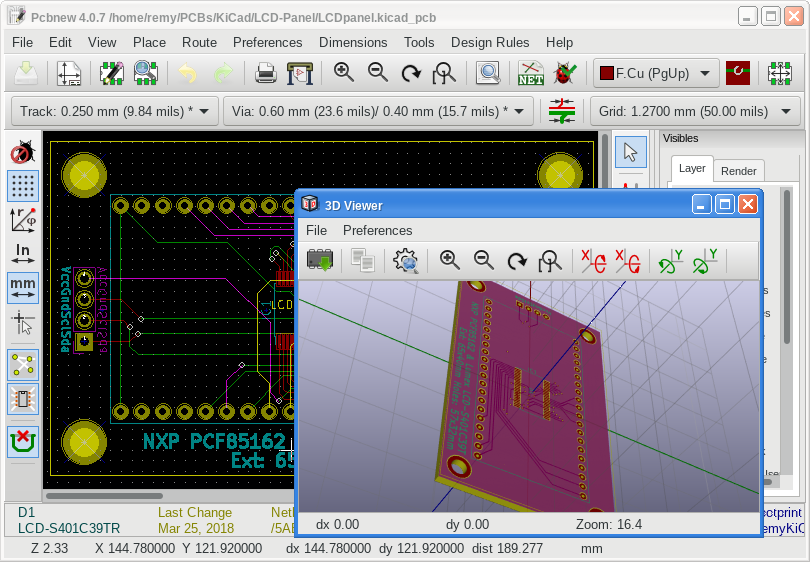
Unlike KiCad 5 and KiCad 7 was not able to get KiCad 4 built when moving over to Slackware 15.0, and with a major overhaul of the footprint and symbol libraries, which included ditching a lot of 3D models due to tightened up requiremnts, I felt it more trouble than it was worth compared to importing designs into KiCad 5. Especially when my old KiCad 4 was a mess and it being relatively difficult to find the original package archives to download, sorting out a proper installation would require a lot of digging. All in this was a case of “because I can” move rather than need or even should.
KiCad 4 Dependencies
KiCad 4 has far fewer dependencies than I remember but they have been over a cliff-edge in terms of the bit-rot that had to be dealt with, and in the process of researching how to get things working I suspect APIs changed more than once. Getting old versions of Boost and CMake to play well together was a particularly bad headache. In comparison KiCad itself only needed two changes and one of them was within the CMake build configuration file.Boost v1.60.0
Boost 1.61.0 made fcontext_t private which breaks KiCad that makes direct use of it, and trying to rewrite KiCad to use what appeared to be the modern way of doing it turned out to be a pain. However Boost v1.60.0 itself had quite a lot of bit-rot most of which was down Python PEP8 changing how object size/type are accessed. Much of the rest was fixing build-time tools rather than the library itself. The snippet below will build and install Boost including applying the patch with all the fixes made in getting it all working.tar -xvf boost_1_60_0.tar.gz cd boost_1_60_0 wget https://www.remy.org.uk/files/Fix-Boost-1.60.0.patch patch -p1 < Fix-Boost-1.60.0.patch ./bootstrap.sh --prefix=/opt/boost/1.60.0 ./build-boost.sh
The patch includes the new build-boost.sh script which contains the content within the snippet below.
It works around some errors resultant from the age of the code as well as disabling several modern warnings.
This makes a debug build because I suspect it might be that bit more stable and even if it is not tracking down a crash would be easier, but if a release build is preferred change variant=debug to variant=release within the script.
#!/bin/bash CXX_FLAGS=$( xargs <<ARGZ -std=c++11 -fpermissive -Wno-cpp -Wno-deprecated-declarations -Wno-format-overflow -Wno-maybe-uninitialized -Wno-nonnull -Wno-parentheses -Wno-sign-compare -Wno-unused-local-typedefs -Wno-unused-result -Wno-uninitialized -Wno-vexing-parse ARGZ ) ./b2 -q cxxflags="${CXX_FLAGS}" install variant=debug
Annoyingly this script cannot simply be cut'n'pasted into a bash interactive session, so has to be saved as a file.
After all this the patched Boost v1.60.0 will be installed under /opt/boost/1.60.0.
CMake v3.4.3
CMake is a massive pain up the arse when it comes to backward compatibility, with CMake v4.0 by default refusing to play with manifests targeting CMake v3.5 resulting in a lot of software packages breaking. However KiCad 4 uses CMake v2.8.4 which causes many versions to fail with the following error. From experimentation v3.4.3 which was the final release before v3.5 was found to be both sufficently new that it did not have any problems compiling due to bit-rot, but conversely also old enough that it does not suffer from the above problem when trying to build KiCad itself.CMake Error at CMakeModules/CheckCXXSymbolExists.cmake:41 (_CHECK_SYMBOL_EXISTS): Unknown CMake command "_CHECK_SYMBOL_EXISTS". Call Stack (most recent call first): CMakeModules/PerformFeatureChecks.cmake:86 (check_cxx_symbol_exists) CMakeLists.txt:141 (perform_feature_checks)
The configuration, building, and finally installation can be done using the following commands.
tar -xzvf CMake-3.4.3.tar.gz mkdir build cd build CFLAGS="-fpermissive" ../CMake-3.4.3/configure --prefix=/opt/cmake/3.4.3 ../CMake-3.4.3 make && make install
CMake v3.4.3 will then be installed under /opt/cmake/3.4.3.
wxWidgets v3.1.2
KiCad 4 directly uses thewxPaintEvent event which had since been made private around the time v3.1.4-rc1 was in development, so using the latest version of WxWidgets results in an error along the lines of the following.
For clarity the full paths normally displayed have been clipped short.
common/draw_panel_gal.cpp: In member function 'void EDA_DRAW_PANEL_GAL::onRefreshTimer(wxTimerEvent&)': common/draw_panel_gal.cpp:413:18: error: 'wxPaintEvent::wxPaintEvent(wxWindowBase*)' is private within this context 413 | wxPaintEvent redrawEvent; | ^~~~~~~~~~~ /opt/wxWidgets/3.2.10/include/wx-3.2/wx/event.h:2425:14: note: declared private here 2425 | explicit wxPaintEvent(wxWindowBase* window = NULL);
Release v3.1.2 of wxWidgets appears to be the most recent that will compile as-is, with v3.1.3 complaining about submodules and zlib. Building and installing it is via the usual tarball commands:
tar -tvf wxWidgets-3.1.2.tar.bz2 mkdir build cd build ../wxWidgets-3.1.2/configure --prefix=/opt/wxWidgets/3.1.2 make -j12 make install
The wxWidgets build will then be installed under /opt/wxWidgets/3.1.2.
Building KiCad 4 itself
Before compiling two changes need to be made to the KiCad source code, one to fix up a missing header include and one that forces the build configuration to pick up Boost v1.60.0 rather than falling back to any version that happens to be installed system-wide. A shell-script is then used to call CMake with the required configuration options. The snippet below includes the downloading and usage of this patch and script.tar -xvf kicad-4.0.7.tar.gz cd kicad.0.7 wget Fix-KiCad-4.patch wget Configure-KiCad-4.sh patch -p1 < Fix-KiCad-4.patch mkdir build cd build ./Configure-KiCad-4.sh make -j12 make install
KiCad 4 will be installed under /opt/kicad/4.0.7 once all this has finished.
Because of installation of shared libraries outside the system search path the enviornment variable ${LD_LIBRARY_PATH} needs seting up, so the shell script below can be used to stat KiCad 4.
#!/bin/bash export LD_LIBRARY_PATH=/opt/wxWidgets/3.1.2/lib:/opt/boost/1.60.0/lib export LD_LIBRARY_PATH=${LD_LIBRARY_PATH}:/opt/kicad/4.0.7/lib64 export LD_LIBRARY_PATH=${LD_LIBRARY_PATH}:/opt/kicad/4.0.7/KiCad/plugins/3d /opt/kicad/4.0.7/bin/KiCad
Remarks
The original plan was to cover KiCad 4, KiCad 5, and possibly KiCad 7, all at the same time but due to relatively little overlap in dependencies KiCad 5 and later will be covered separately. Looking back I am surprised at how many of my more iconic circuits were made with KiCad 4 so guessing it was only during Covid lockdown I properly switched over, but having done so I doubt I would want to re-learn the old way that KiCad4 operated. KiCad has made big strides since version 4, which was back before the schematic and PCB editors had undergone any serious integration beyond being accessed from the same top-level project manager.However the biggest problem is getting hold of KiCad 4 data-files as hosting moved over to GitLab and this only goes back to v5.0.0 when there was a major reorganisation of component resources. In particular the requirements for 3D component models was tightened up a lot which resulted in many of them being removed. However the one time I went back to a KiCad 4 project and did a revision in KiCad 5 it seemed to go very well, probably because the schematic and PCB layout part of the file format was were much the same. I think KiCad 4 is the one instance where keeping the actual version around is not really worth the effort, but practical use was not the driving force behind getting it working.