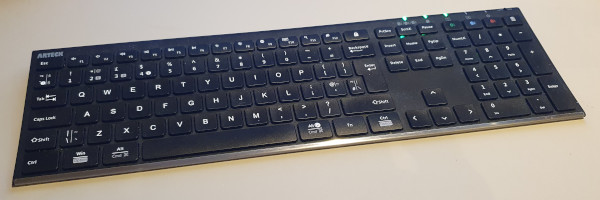
Arteck HB192 keyboard
02 October 2025I bought the Arteck
HB192 as it had the option of connecting with upto three host device and switching between them at the press of a button.
More often these days have been working from home with both my personal workstation and company laptop on my desk and conneted to my display via a monitor switch.
However having two physical keyboards on the desk is a pain, especially when switching between the two systems a lot.
On a whim I looked for a keyboard that supported switching between computers at a press of a button and came across the HB192 which at £38 seemed to be worth a try.
Linux connectivity
Having connected the laptop and a Nulea trackball that also has multi-host support to both my personal Slackware-based system and my Ubuntu-based copany laptop, one problem in both is the Bluetooth GUI tools being unreliable and it sometimes taking a while to coax devices into pairing and automatically reconnecting. I ended up using thebluetoothctl command-line based interface to get the MAC addresses of the devices with scan on then using the pair and trust commands to set it up, rather than using the system tray app.
Since my desktop had no existing bluetooth adapter had to order one in, but made the mistake of going for a cheap UGREEN which ended up getting returned and replaced with an ASUS when it turned out not to have Linux support.
How it feels
A £38 keyboard is simply not going to feel anything like the same as the circa £100 Logitech K750 but ultimately a keyboard is a keyboard and the noticably different build quality is not a big issue. Once actually setup the keyboard switches between computer systems within a few seconds, which is both faster and substantially more convenient than swapping keyboards. It is annoying that with IceWM a newly reconneted keyboard defaults to US layout rather than UK but runningsetxkbmap "gb" fixes this and at some point will get around to working how to automate this with a UDev rule.
The shortcomings
The one big problem is unless the return key is pressed firmly right on its centre a key press is often not registered. With typing my fingers often land on the right-hand edge of the key and only that edge rather than the whole key travels downwards rather than having a uniformly flat movement. The spring mechanism is obviously intended to make sure the key moves straight down but in practice when pressed on the edge it twists enough that it is possible for that edge to be almost all the way down but the middle of the button not quite far enough to actuate the button. On some occasions a double-press is registered which is an even worse outcome.
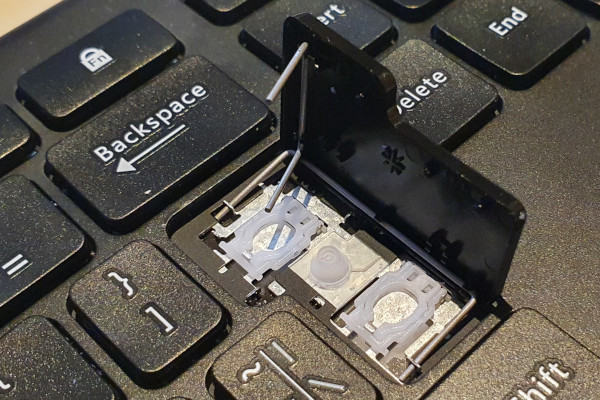
After having the keyboard for a fortnight decided that this was something I did not want to go through having to get used to so earlier in the week ordered in a replacement. It was fine for relatively light usage but when needing to think hard it was simply that bit too distracting. I had thought of modding the key such as placing a piece of card so that less travel was needed before it made contact with the button but decided against the hassle of experimentation as the button is a pain to reassemble once popped.